
 <p>Hunting for a job is all about standing out. But that’s difficult when online postings often get hundreds of faceless applicants. If you want a chance to get called for an interview, then you need to leave a good impression on the employer.</p><p>One way to distinguish yourself from the other candidates is with a video resume. A video resume shows your personality, skills and experience all at once. Let’s go over top tips for making a video resume, plus excellent examples of video resumes to help inspire you.</p><h2 id="why-would-you-need-a-video-resume">Why would you need a video resume?</h2><p>A video resume isn’t just a work summary; it’s a personal overview that’s more insightful than any piece of paper. Making a video resume gives hiring managers a sense of what you’re like the moment they see your name. This way, interviews aren’t necessary for employers to get a feel for your personality; video resumes are memorable and insightful from the start.</p><p>In addition to distinguishing yourself from the hundreds of other applicants, you can use a video resume to show off performance-based skills. Acting, teaching, and presenting are all on display with a solid video resume. If you’re applying for a client-facing role, such as a salesperson, a video resume can also show how well you do with people.</p><p>While a video resume can have a positive impact on your application process, a poorly done video can tank your chances of getting a callback. If you want your video resume to catch an employer’s attention — in a good way — then you need to do it right.</p><h2 id="how-to-make-a-good-video-resume-9-tips">How to make a good video resume: 9 tips</h2><p>Want to make a video resume that employers will take note of? Follow these tips, and your video will shine rather than crash and burn.</p><h3 id="1-write-a-script">1. Write a script</h3><p>Creating the best paper resume takes time, and you won’t finish your video resume in one take, either. But writing a script makes the process much easier.</p><p>Start with your existing resume by putting its highlights in narrative form. Then, mention your relevant skills and why they’d fit the position well. Bring up any previous experience where it could help. </p><p>Include hard numbers when you can — maybe you oversaw a team of twenty people or contributed to a 60% sales boost. Talk about your education if you think it’s important as well. Finally, rehearse and fine-tune your script. When revising, the natural flow of your script should be a top priority.</p><p>Need help perfecting your script? Restream’s free AI script writing tool provides you with a clean and captivating video script in seconds. Just type in your details and accomplishments, choose the tone you want, and hit Generate Script! </p><div class="kg-card kg-button-card kg-align-center">Generate script</div><h3 id="2-tell-your-story">2. Tell your story</h3><p>A video resume lets you do something a paper resume can’t: tell a story. With a paper resume, a hiring manager has to piece together a whole person from text on a page. With a video resume, you can share something from your background that resonates with the employer.</p><p>Put your skills and experience into context by creating a story around them. Don’t make a video resume just to rattle off a list of achievements.</p><h3 id="3-keep-it-brief">3. Keep it brief</h3><p>Video resumes shouldn’t take much time to watch. You’re presenting your candidacy for employment, not going after views on YouTube. </p><p>60-90 seconds is the ideal length for a video resume, and two minutes is the maximum length. Cut down your time by filming a few script readings and removing the extraneous bits.</p><h3 id="4-provide-a-cta-call-to-action">4. Provide a CTA (Call to Action)</h3><p>The end of your video resume should urge employers to take some sort of action. How can they follow up with you? Do you have a portfolio website they can visit or a LinkedIn profile to look at?</p><p>If you post your video resume on a platform like YouTube instead of sending a video file directly, include relevant links in the video description.</p><h3 id="5-use-good-lighting">5. Use good lighting</h3><p>Quality lighting gives your video resume that sought-after professional look. You won’t need a high-tech camera as long as you light your video properly. Don’t stand under direct lighting, as it’ll cast harsh shadows over your face. Use natural lighting when you can by placing the camera between you and the natural light source.</p><p>A good video lighting setup has a key light, fill light, and back light. Using all three lights balances contrast and shadows perfectly. You can read more about how to pull off excellent video lighting in our guide.</p><h3 id="6-select-reliable-audio-and-video-sources">6. Select reliable audio and video sources</h3><p>For a higher-quality video, use an external mic and camera. A standard webcam and good lighting makes for a great video, but you can upgrade to a DSLR camera to go the extra mile.</p><p>For a microphone, you can choose a standing/shotgun mic or a lav mic. Standing mics are typically either USB, which plug directly into your computer, or XLR, which requires an audio interface to use. While recording, make sure nothing appears in-picture to distract from you. With this in mind, using a clip-on or lav mic might be the best choice.</p><h3 id="7-boost-your-on-camera-confidence">7. Boost your on-camera confidence</h3><p>If you’re not used to being on camera, take the time to rehearse and build confidence. Practice in front of a mirror, paying attention to your body language and expressions. Remember to keep your posture upright, relax your neck muscles, and hold your shoulders back.</p><p>On the day of the shoot, get a good night’s sleep and drink plenty of water. When filming, look into the camera to simulate eye contact with the viewer. Wear something appropriate for an in-person interview as well.</p><h3 id="8-get-feedback">8. Get feedback</h3><p>After you’ve recorded some takes for your resume, don’t just review them on your own. Ask a friend, colleague, or mentor for constructive feedback on your best takes. A fresh perspective could spot something that’s missing or overstated in your video. It may take more time to polish your video resume this way, but the fine-tuned results are worth it.</p><h3 id="9-choose-the-right-tools">9. Choose the right tools</h3><p>Everyone wants their video resume to look professional. An external mic, webcam, and good lighting are essential for a quality video. However, using the right software is what elevates your video above the rest.</p><p>Restream Studio gives you all the power of webcam software without any apps or downloads. Our browser-based live streaming solution lets you switch to “record-only” mode for your video resumes. That way, Studio’s awesome features — custom graphics, local video playback, screen sharing, and copyright-free music — can be used in your video.</p><div class="kg-card kg-product-card">
<div class="kg-product-card-container">
<p>Hunting for a job is all about standing out. But that’s difficult when online postings often get hundreds of faceless applicants. If you want a chance to get called for an interview, then you need to leave a good impression on the employer.</p><p>One way to distinguish yourself from the other candidates is with a video resume. A video resume shows your personality, skills and experience all at once. Let’s go over top tips for making a video resume, plus excellent examples of video resumes to help inspire you.</p><h2 id="why-would-you-need-a-video-resume">Why would you need a video resume?</h2><p>A video resume isn’t just a work summary; it’s a personal overview that’s more insightful than any piece of paper. Making a video resume gives hiring managers a sense of what you’re like the moment they see your name. This way, interviews aren’t necessary for employers to get a feel for your personality; video resumes are memorable and insightful from the start.</p><p>In addition to distinguishing yourself from the hundreds of other applicants, you can use a video resume to show off performance-based skills. Acting, teaching, and presenting are all on display with a solid video resume. If you’re applying for a client-facing role, such as a salesperson, a video resume can also show how well you do with people.</p><p>While a video resume can have a positive impact on your application process, a poorly done video can tank your chances of getting a callback. If you want your video resume to catch an employer’s attention — in a good way — then you need to do it right.</p><h2 id="how-to-make-a-good-video-resume-9-tips">How to make a good video resume: 9 tips</h2><p>Want to make a video resume that employers will take note of? Follow these tips, and your video will shine rather than crash and burn.</p><h3 id="1-write-a-script">1. Write a script</h3><p>Creating the best paper resume takes time, and you won’t finish your video resume in one take, either. But writing a script makes the process much easier.</p><p>Start with your existing resume by putting its highlights in narrative form. Then, mention your relevant skills and why they’d fit the position well. Bring up any previous experience where it could help. </p><p>Include hard numbers when you can — maybe you oversaw a team of twenty people or contributed to a 60% sales boost. Talk about your education if you think it’s important as well. Finally, rehearse and fine-tune your script. When revising, the natural flow of your script should be a top priority.</p><p>Need help perfecting your script? Restream’s free AI script writing tool provides you with a clean and captivating video script in seconds. Just type in your details and accomplishments, choose the tone you want, and hit Generate Script! </p><div class="kg-card kg-button-card kg-align-center">Generate script</div><h3 id="2-tell-your-story">2. Tell your story</h3><p>A video resume lets you do something a paper resume can’t: tell a story. With a paper resume, a hiring manager has to piece together a whole person from text on a page. With a video resume, you can share something from your background that resonates with the employer.</p><p>Put your skills and experience into context by creating a story around them. Don’t make a video resume just to rattle off a list of achievements.</p><h3 id="3-keep-it-brief">3. Keep it brief</h3><p>Video resumes shouldn’t take much time to watch. You’re presenting your candidacy for employment, not going after views on YouTube. </p><p>60-90 seconds is the ideal length for a video resume, and two minutes is the maximum length. Cut down your time by filming a few script readings and removing the extraneous bits.</p><h3 id="4-provide-a-cta-call-to-action">4. Provide a CTA (Call to Action)</h3><p>The end of your video resume should urge employers to take some sort of action. How can they follow up with you? Do you have a portfolio website they can visit or a LinkedIn profile to look at?</p><p>If you post your video resume on a platform like YouTube instead of sending a video file directly, include relevant links in the video description.</p><h3 id="5-use-good-lighting">5. Use good lighting</h3><p>Quality lighting gives your video resume that sought-after professional look. You won’t need a high-tech camera as long as you light your video properly. Don’t stand under direct lighting, as it’ll cast harsh shadows over your face. Use natural lighting when you can by placing the camera between you and the natural light source.</p><p>A good video lighting setup has a key light, fill light, and back light. Using all three lights balances contrast and shadows perfectly. You can read more about how to pull off excellent video lighting in our guide.</p><h3 id="6-select-reliable-audio-and-video-sources">6. Select reliable audio and video sources</h3><p>For a higher-quality video, use an external mic and camera. A standard webcam and good lighting makes for a great video, but you can upgrade to a DSLR camera to go the extra mile.</p><p>For a microphone, you can choose a standing/shotgun mic or a lav mic. Standing mics are typically either USB, which plug directly into your computer, or XLR, which requires an audio interface to use. While recording, make sure nothing appears in-picture to distract from you. With this in mind, using a clip-on or lav mic might be the best choice.</p><h3 id="7-boost-your-on-camera-confidence">7. Boost your on-camera confidence</h3><p>If you’re not used to being on camera, take the time to rehearse and build confidence. Practice in front of a mirror, paying attention to your body language and expressions. Remember to keep your posture upright, relax your neck muscles, and hold your shoulders back.</p><p>On the day of the shoot, get a good night’s sleep and drink plenty of water. When filming, look into the camera to simulate eye contact with the viewer. Wear something appropriate for an in-person interview as well.</p><h3 id="8-get-feedback">8. Get feedback</h3><p>After you’ve recorded some takes for your resume, don’t just review them on your own. Ask a friend, colleague, or mentor for constructive feedback on your best takes. A fresh perspective could spot something that’s missing or overstated in your video. It may take more time to polish your video resume this way, but the fine-tuned results are worth it.</p><h3 id="9-choose-the-right-tools">9. Choose the right tools</h3><p>Everyone wants their video resume to look professional. An external mic, webcam, and good lighting are essential for a quality video. However, using the right software is what elevates your video above the rest.</p><p>Restream Studio gives you all the power of webcam software without any apps or downloads. Our browser-based live streaming solution lets you switch to “record-only” mode for your video resumes. That way, Studio’s awesome features — custom graphics, local video playback, screen sharing, and copyright-free music — can be used in your video.</p><div class="kg-card kg-product-card">
<div class="kg-product-card-container">
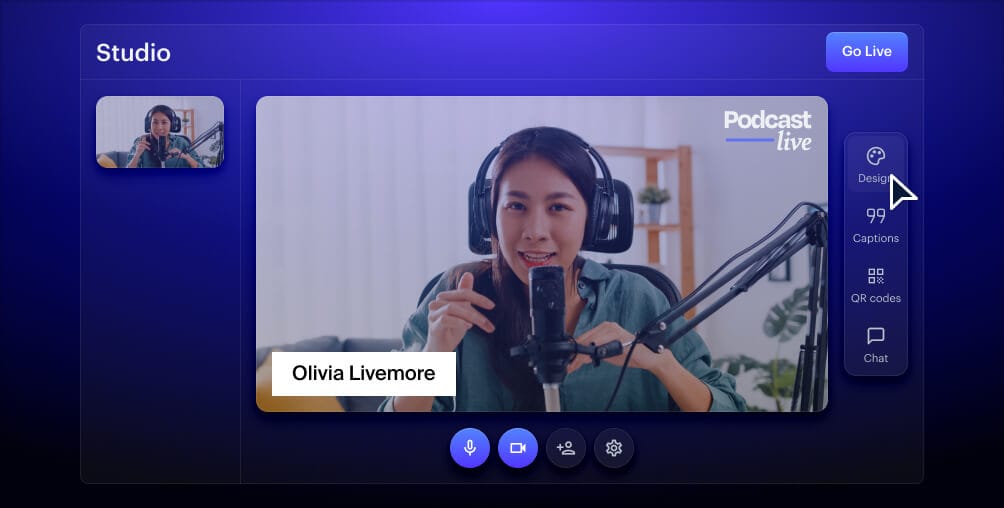 <div class="kg-product-card-title-container">
<h4 class="kg-product-card-title">Create stunning live videos</h4>
</div>
<div class="kg-product-card-title-container">
<h4 class="kg-product-card-title">Create stunning live videos</h4>
</div>
<div class="kg-product-card-description"><p><span style="white-space: pre-wrap;">Restream Studio is the easiest way to create high-quality live videos on multiple platforms at once. It's user-friendly and offers an engaging viewer experience.</span></p></div>
<a class="kg-product-card-button kg-product-card-btn-accent" href="https://studio.restream.io/" rel="noopener noreferrer" target="_blank"><span>Get started</span></a>
</div>
</div><h2 id="awesome-video-resume-examples">Awesome video resume examples</h2><p>Need some inspiration for your video resume? These examples provide some excellent ideas for how to pull off your own video.</p><h3 id="%E2%80%9Cthe-interview-thingy%E2%80%9D-%E2%80%93-video-cv">“The Interview Thingy” – VIDEO CV</h3><p>In this <a href="https://www.youtube.com/watch?v=SZGxqbDoBUo"><u>video</u></a>, Alex structures her CV more like a job interview, portraying both herself and an “interviewer” who asks her questions about her experience. She uses voiceovers, animation, and photos in complex ways, yet the results are simple, entertaining, and informative.</p><figure class="kg-card kg-embed-card"></figure><h3 id="short-video-resume-by-saji-nair">Short Video Resume by Saji Nair</h3><p>In a <a href="https://www.youtube.com/watch?v=OZzEBa9cHN0"><u>90-second video</u></a>, job-seeker Saji Nair presents her personality, experience, and relevant skills before explaining why a company should hire her. She keeps the video professional with a plain white background and even lighting.</p><figure class="kg-card kg-embed-card"></figure><h3 id="arthur-coppensvideo-cv-2018">Arthur Coppens - Video CV 2018</h3><p>Arthur Coppens has a snappy <a href="https://www.youtube.com/watch?v=gh43P-XoWmg"><u>video CV</u></a> that does a lot in less than 90 seconds. Notably, he chooses a natural setting with calming outdoor sounds instead of using royalty-free music. Arthur uses dynamic text, sound effects, and animations to clearly outline his hobbies and work experience. He also provides a quick visual clip for each of his interactive design projects.</p><figure class="kg-card kg-embed-card"></figure><h3 id="cv-videoaurora-puriqi">CV Video - Aurora Puriqi</h3><p>Aurora Puriqi’s <a href="https://www.youtube.com/watch?v=JevEPinNOZk"><u>CV video</u></a> is engaging, informative, and comprehensive. She gives a full rundown of her prior experiences and uses images and videos of her old projects. She narrates her experience in a voiceover while on her way to an interview, which breaks up the monotony of her just talking about her experiences.</p><figure class="kg-card kg-embed-card"></figure><h3 id="motion-graphics-%E2%80%93-cv">Motion Graphics – CV</h3><p>Kristiyan Despodov takes a different approach to a <a href="https://www.youtube.com/watch?v=IyiDezZAbnc"><u>video CV</u></a> by showcasing his design skills. He’s created more of a portfolio video than a CV, which is an excellent choice for someone in a creative field like graphic design.</p><figure class="kg-card kg-embed-card"></figure><h3 id="best-video-cv-ever-%E2%80%93-mark-leruste">Best Video CV Ever – Mark Leruste</h3><p>Mark Leruste’s <a href="https://www.youtube.com/watch?v=c_PZTAW5piQ"><u>funny CV video</u></a> has a conversational tone and uses lots of engaging visuals to keep you hooked as he talks about his experiences, interests, and skills.</p><figure class="kg-card kg-embed-card"></figure><h2 id="let%E2%80%99s-wrap-up">Let’s wrap up</h2><p>Making a video resume will grab the attention of hiring managers in any field. A video resume is also a great medium to showcase your creativity skills and relevant projects. If you stick to our video resume tips, you’ll be able to create an engaging and informative video. Remember, Restream Studio’s great features and accessibility will make for a high-quality and professional video too. Good luck on the job hunt!</p>