AI agents aren’t coming—they’re already in your environment. They show up in places you expect (like Microsoft Copilot, Microsoft Teams, and Microsoft 365) and even more places as technology evolves (a local autonomous personal AI assistant or a new software as a service (SaaS) agent connected to your sensitive data.)
The problem isn’t that agents exist. It’s that they proliferate fast, span apps, endpoints and cloud, and often operate outside the visibility and control of the teams accountable for risk. When an agent can invoke tools, access data, and interact with other agents, any “helpful” workflow can turn into data oversharing, tool misuse, or over-privileged actions in seconds. And as agents become even easier to create and deploy, your attack surface grows with them.
That’s why end-to-end observability matters: you can’t govern what you can’t see, and you can’t secure what you don’t understand—especially when the number of agents is a moving target.
Microsoft Agent 365 helps you take control of agent sprawl as your control plane to observe, govern, and secure agents and their interactions—including agents built with Microsoft AI and agents from our ecosystem partners—using the admin and security workflows your teams already run.
Additionally, we’re announcing the previews of new Agent 365 capabilities and integrations to help you scale agent adoption with the right controls in place.
Observability, governance, and security for agents operating independently—Agent 365 is expanding to cover agents that operate with their own credentials and permissions.
A secured, managed environment for agents to work in Windows 365 for Agents.
Coverage for a wide ecosystem of SaaS agents, including agents innovated by software development companies (SDCs).
Support for evaluation, adoption, and usage from Microsoft and ecosystem partners worldwide.
Manage agents with a single control plane, regardless of how or where they work
As organizations move from pilot to adoption, AI agents are being deployed across increasingly diverse use cases. Some act with delegated access, working on behalf of users; others operate with their own credentials and permissions, participating in team workflows or operating behind the scenes.
With Agent 365, you can observe, govern, and secure AI agents whether they act on behalf of users with delegated access—for example, an agent that helps employees organize their inbox—or agents that operate with their own access and scope of work—such as an agent autonomously triaging support tickets.
Supported by Agent 365
Agents working on behalf of users (delegated access) Generally available
Agents operating behind the scenes (own access) Generally available
Agents participating in team workflows (own access) Public Preview
Discover and manage local and cloud-hosted agents
Users are installing agents like OpenClaw and Claude Code on their devices and adopting SaaS agents built by developers on new and emerging platforms. Many of these local and cloud-hosted agents run unmanaged and outside of traditional governance, as they autonomously execute tasks, modify code, or access confidential information, creating a new wave of shadow AI.
To help organizations address accelerating agent sprawl and the rise of unmanaged agents, we’re introducing new capabilities as part of Agent 365, Microsoft Defender, and Intune so you can discover shadow agents, and apply appropriate controls, such as blocking unmanaged agents.
Discover and manage local agents
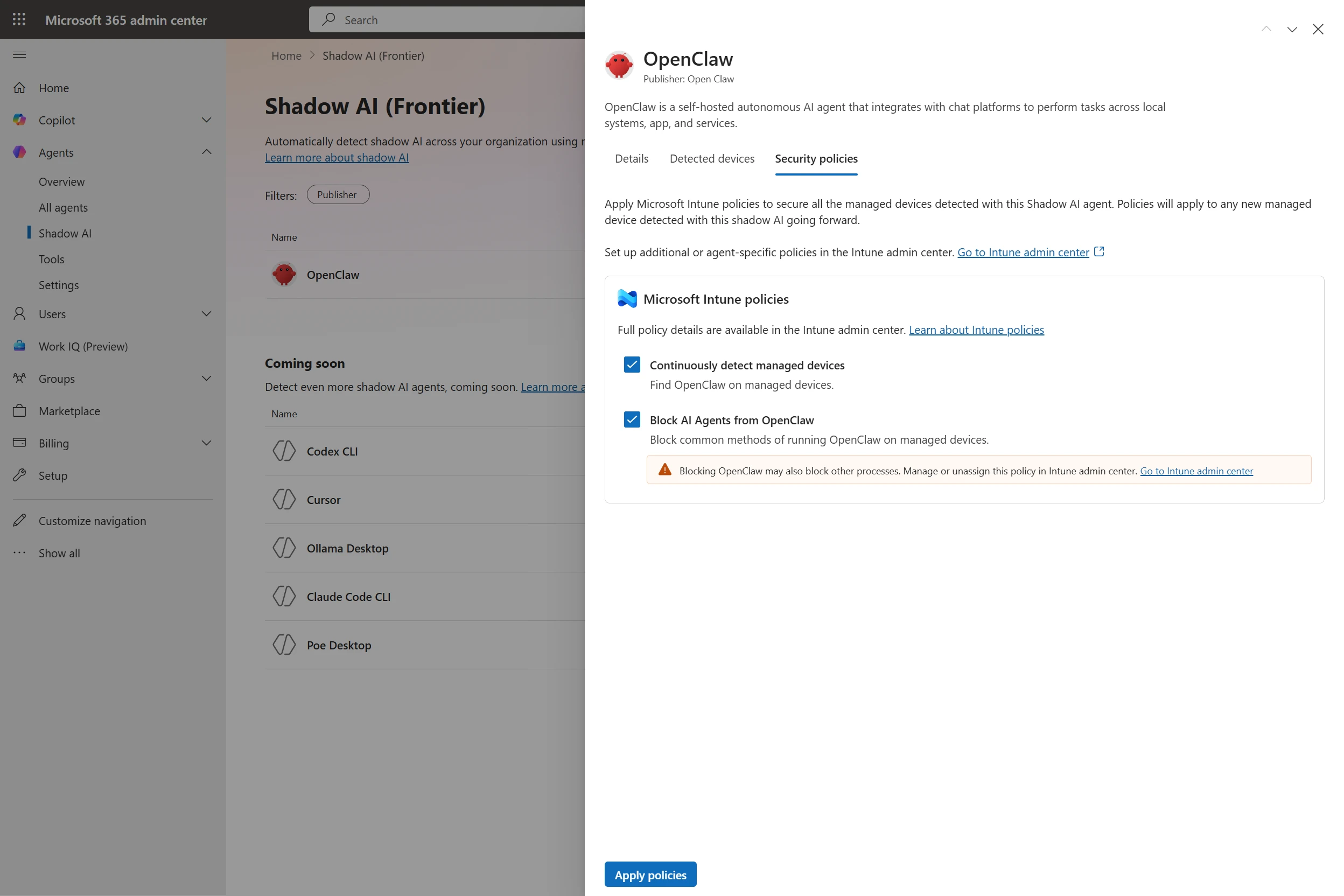
With Microsoft Defender and Intune, organizations will be able to discover and manage local AI agents running on Windows devices, starting with OpenClaw agents and expanding soon to other widely used agents like GitHub Copilot CLI and Claude Code. Customers enrolled in the Frontier program can see if OpenClaw agents are being used in the organization, which devices they are running on, and use Intune policies to block common ways that OpenClaw runs on the new Shadow AI page in Agent 365 in the Microsoft 365 admin center and in the Intune admin center. Through Agent 365 registry, the inventory of local agents will be available in Defender and Intune so IT, endpoint management, and security teams can get a consistent view of discovered local agents in their environment and take appropriate action.