
Hardcoded secrets still show up in Jenkins for very ordinary reasons.
A token is pasted into a job field during a quick test. A webhook URL with a secret query parameter stays in config.xml. An inline Pipeline header works once and is never revisited. These cases are easy to introduce and easy to overlook.
Once a secret is stored in job configuration or a Jenkinsfile, it becomes harder to rotate and easier to expose through exports, backups, logs, or screenshots.
The Secret Guard Plugin was created to help Jenkins administrators and job authors catch those patterns earlier.
What it checks</h2>
Secret Guard is a Jenkins plugin that checks Jenkins jobs and Pipeline definitions for hardcoded secret leakage risks.
It scans common high-risk locations such as:
-
Job config.xml
-
inline Pipeline scripts
-
Pipeline-from-SCM Jenkinsfiles when lightweight SCM access is available
-
multibranch Pipeline Jenkinsfiles when lightweight SCM access is available
-
parameter default values
-
environment variable definitions
-
command content such as sh, bat, powershell, and HTTP-style request usage
It can be used in several practical ways:
-
save-time enforcement for job configuration changes
-
build-time scanning
-
job-level Scan Now
-
global Scan All Jobs
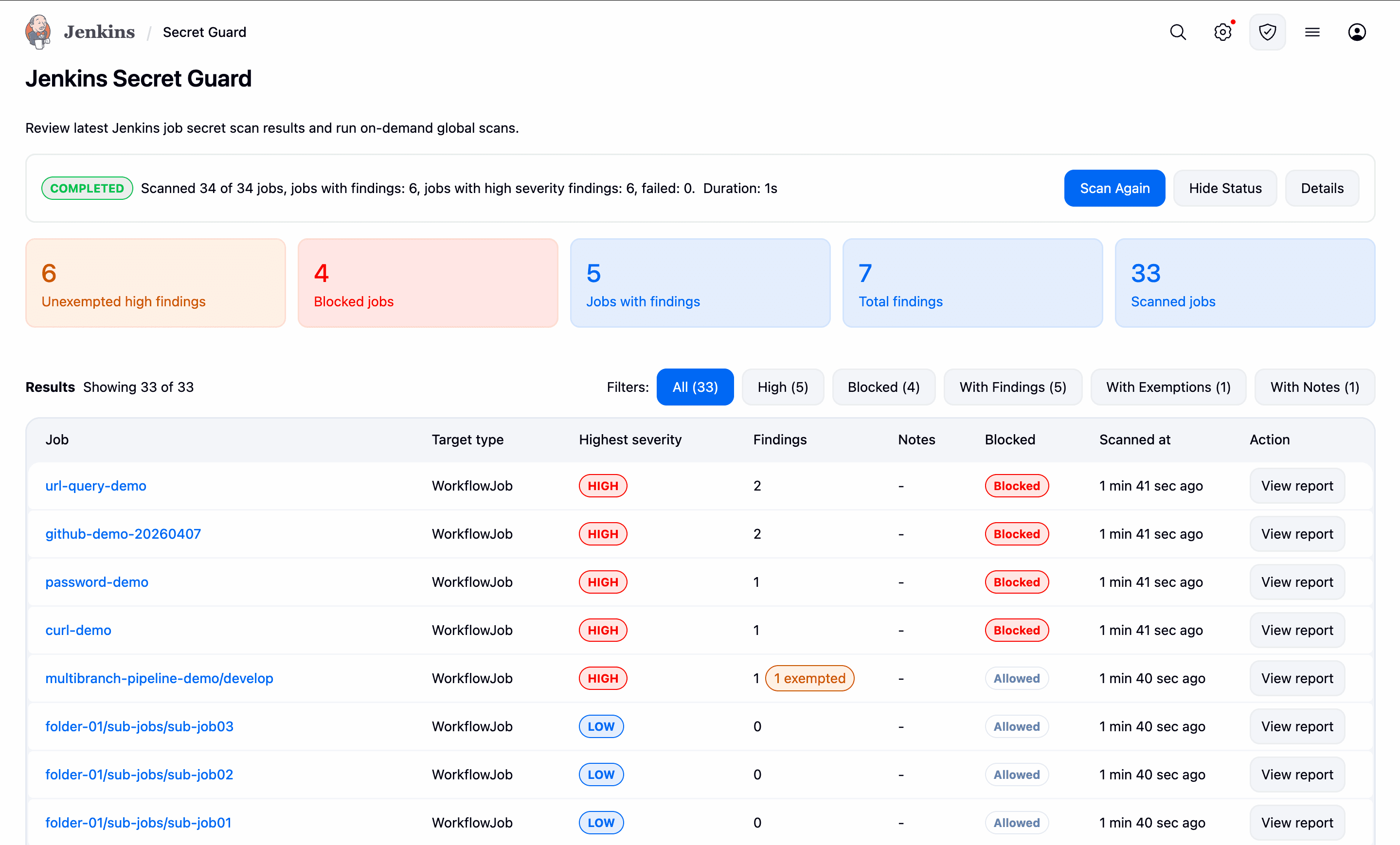
The plugin stores masked results only, so administrators can review findings without persisting raw secret values in plugin reports.
The global Secret Guard page gives administrators a single place to review the latest scan results and run an on-demand scan across jobs.
A simple example</h2>
A common case is a Pipeline that embeds a token directly in an environment variable or HTTP header:
pipeline {
    agent any
    environment {
        API_TOKEN = 'ghp_012345678901234567890123456789012345'
    }
    stages {
        stage('Call API') {
            steps {
                sh "curl -H 'Authorization: Bearer eyJhbGciOiJIUzI1NiJ9.abc123456789.def123456789' https://example.invalid"
            }
        }
    }
}
The safer pattern is to store the secret in Jenkins Credentials and inject it only at runtime:
pipeline {
    agent any
    stages {
        stage('Call API') {
            steps {
                withCredentials([string(credentialsId: 'api-token', variable: 'API_TOKEN')]) {
                    sh 'curl -H "Authorization: Bearer $API_TOKEN" https://example.invalid'
                }
            }
        }
    }
}
This is the kind of issue Secret Guard is designed to catch with deterministic rules rather than broad inference.
</div>
Secret Guard is a Jenkins plugin that checks Jenkins jobs and Pipeline definitions for hardcoded secret leakage risks.
It scans common high-risk locations such as:
-
Job
config.xml -
inline Pipeline scripts
-
Pipeline-from-SCM Jenkinsfiles when lightweight SCM access is available
-
multibranch Pipeline Jenkinsfiles when lightweight SCM access is available
-
parameter default values
-
environment variable definitions
-
command content such as
sh,bat,powershell, and HTTP-style request usage
It can be used in several practical ways:
-
save-time enforcement for job configuration changes
-
build-time scanning
-
job-level
Scan Now -
global
Scan All Jobs
The plugin stores masked results only, so administrators can review findings without persisting raw secret values in plugin reports.
The global Secret Guard page gives administrators a single place to review the latest scan results and run an on-demand scan across jobs.
A simple example</h2>
A common case is a Pipeline that embeds a token directly in an environment variable or HTTP header:
pipeline {
agent any
environment {
API_TOKEN = 'ghp_012345678901234567890123456789012345'
}
stages {
stage('Call API') {
steps {
sh "curl -H 'Authorization: Bearer eyJhbGciOiJIUzI1NiJ9.abc123456789.def123456789' https://example.invalid"
}
}
}
}
The safer pattern is to store the secret in Jenkins Credentials and inject it only at runtime:
pipeline {
agent any
stages {
stage('Call API') {
steps {
withCredentials([string(credentialsId: 'api-token', variable: 'API_TOKEN')]) {
sh 'curl -H "Authorization: Bearer $API_TOKEN" https://example.invalid'
}
}
}
}
}
This is the kind of issue Secret Guard is designed to catch with deterministic rules rather than broad inference.
</div>
A common case is a Pipeline that embeds a token directly in an environment variable or HTTP header:
pipeline {
agent any
environment {
API_TOKEN = 'ghp_012345678901234567890123456789012345'
}
stages {
stage('Call API') {
steps {
sh "curl -H 'Authorization: Bearer eyJhbGciOiJIUzI1NiJ9.abc123456789.def123456789' https://example.invalid"
}
}
}
}The safer pattern is to store the secret in Jenkins Credentials and inject it only at runtime:
pipeline {
agent any
stages {
stage('Call API') {
steps {
withCredentials([string(credentialsId: 'api-token', variable: 'API_TOKEN')]) {
sh 'curl -H "Authorization: Bearer $API_TOKEN" https://example.invalid'
}
}
}
}
}This is the kind of issue Secret Guard is designed to catch with deterministic rules rather than broad inference.