 <p>I published my first Apify Actor at the end of 2024 after several years of building scrapers and automation tools in Go. Go is my most productive language, and most of my side projects are already written in it.</p>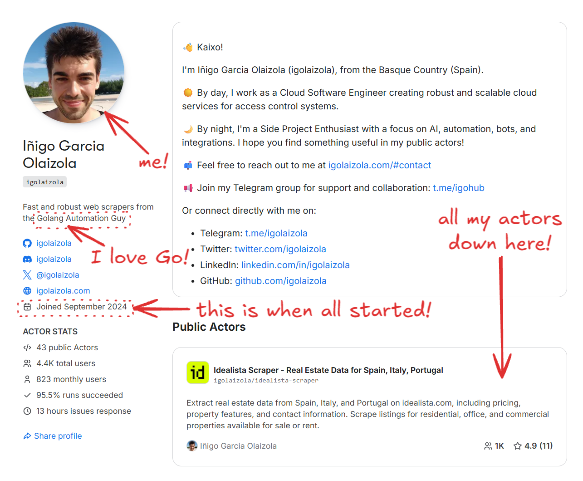
actors/<name>, while shared Apify-related logic sits in pkg/apify. This lets me reuse the same API client, logging conventions, and output logic across dozens of Actors without copy-pasting.</p><p>I chose to work directly with the Apify API for two main reasons:</p><ol><li>I wanted full control over runtime cost and memory usage. A thin client means no hidden buffers, no background workers, and no extra dependencies.</li><li>Go is my default language. I iterate faster in a language I already know well than by learning a new SDK surface.</li></ol><p>The downside is obvious: I own the edge cases and any API changes. I’ll come back to those trade-offs later.</p><h2 id="architecture-overview">Architecture overview</h2><h3 id="repository-layout">Repository layout</h3><p>This is a simplified version of the core structure:</p><pre>actors/
fbads/
cmd/fbads/
fbads.go
.actor/
pkg/
apify/
client.go
apify.go
saver.go
Dockerfile
Makefile
</pre><p>Each Actor has its own cmd/<actor> entrypoint and a package under actors/<actor> containing the business logic. Shared Apify interaction code lives in pkg/apify, which includes:</p><ul><ul><li>a small HTTP client for Apify API calls (client.go, apify.go)</li></ul><li>an output saver that writes to the Apify dataset or to a local JSON file (saver.go)</li><li>helpers for input parsing and key-value store access</li></ul><p>This keeps Actor-specific code small and makes it easy to roll out improvements across all Actors.</p><h3 id="the-dual-mode-runtime">The dual-mode runtime</h3><p>Every Actor runs in two modes:</p><ul><li>Local mode, for development and debugging</li><li>Apify mode, when running on the platform</li></ul><p>The Actor decides which mode it’s in by checking environment variables. I use ACTOR_RUN_ID as the switch:</p><pre>var apifyClient *apify.Client
if os.Getenv("ACTOR_RUN_ID") == "" {
// Local mode: read input from file or CLI, write JSON to a file
} else {
// Apify mode: read input from Apify KV store, write to dataset
apifyClient, err = apify.NewActor(cfg.Debug)
}
</pre><p>This single check keeps both execution paths aligned and avoids the common problem where “local mode” slowly diverges from how the Actor behaves on Apify.</p><h2 id="building-a-go-actor-with-the-apify-api">Building a Go Actor with the Apify API</h2><h3 id="input-handling-and-schema-alignment">Input handling and schema alignment</h3><p>When running on Apify, I fetch the input directly from the key-value store. The client performs a simple GET request:</p><pre>func (c *Client) GetInput(ctx context.Context, v any) error {
u := fmt.Sprintf("v2/key-value-stores/%s/records/INPUT", c.key)
if _, err := c.do(ctx, "GET", u, nil, v); err != nil {
return fmt.Errorf("apify: couldn't get input: %w", err)
}
return nil
}</pre><p>The input schema maps directly to a Go struct. For facebook-ad-library-scraper, it looks like this:</p><pre>type Input struct {
ProxyConfiguration apify.ProxyConfiguration `json:"proxyConfiguration"`
MaxItems int `json:"maxItems"`
Query string `json:"query"`
Advertisers []string `json:"advertisers"`
Country string `json:"country"`
Category string `json:"category"`
MediaType string `json:"mediaType"`
MinDate string `json:"minDate"`
MaxDate string `json:"maxDate"`
ActiveStatus string `json:"activeStatus"`
}</pre><p>In local mode, I reuse the same struct but load it from a JSON file or a raw JSON string. This keeps local tests tightly aligned with real Apify input and avoids surprises when deploying.</p><h3 id="output-handling-and-dataset-writes">Output handling and dataset writes</h3><p>For output, I push items to the default dataset when running on Apify and write to a local JSON file in local mode. This logic is centralized in pkg/apify/saver.go:</p><pre>func (s *Saver[T]) Save(ap *Client, output string, current []T) error {
ctx, cancel := context.WithTimeout(context.Background(), time.Minute)
defer cancel()
if ap != nil {
if ap.MaxChargeReached() {
return errors.New("apify: max charge reached")
}
if err := ap.SaveItems(ctx, current); err != nil {
return err
}
if ap.isPPE {
if err := ap.AddCharge(ap.resultEvent, len(current)); err != nil {
return err
}
}
return nil
}
// Otherwise append to a local JSON file } </code></pre><p>Some of the logic here is specific to <a href="https://docs.apify.com/platform/actors/publishing/monetize/pay-per-event"><u>pay-per-event (PPE) Actors</u></a>, which I’ll cover later. Under the hood, <code>SaveItems</code> is just a direct API call to the dataset endpoint:</p><pre><code class="language-go">func (c *Client) SaveItems(ctx context.Context, v any) error {
u := fmt.Sprintf("v2/datasets/%s/items", c.dataset)
if _, err := c.do(ctx, "POST", u, v, nil); err != nil {
return fmt.Errorf("apify: couldn't put items: %w", err)
}
return nil }</code></pre><p>Centralizing this logic keeps behavior consistent across all Actors, both locally and on the platform.</p><h3 id="proxies">Proxies</h3><p>Proxy configuration comes from input. I support both <a href="https://apify.com/proxy" rel="noreferrer">Apify Proxy</a> and external proxies.</p><p>When Apify Proxy is requested, I resolve proxy groups and country settings into a concrete proxy URL. The part I care about most is how the username is constructed from proxy groups and country:</p><pre><code class="language-go">username := "auto" var parts []string if len(cfg.ApifyProxyGroups) > 0 {
parts = append(parts, fmt.Sprintf("groups-%s", strings.Join(cfg.ApifyProxyGroups, "+"))) } if cfg.ApifyProxyCountry != "" {
parts = append(parts, fmt.Sprintf("country-%s", strings.ToUpper(cfg.ApifyProxyCountry))) } if len(parts) > 0 {
username = strings.Join(parts, ",") } proxyURL, err := url.Parse(fmt.Sprintf("http://%s:%s@%s:%s", username, password, host, port)) if err != nil {
return nil, fmt.Errorf("couldn't parse proxy URL: %w", err) }</code></pre><p>This gives me predictable proxy behavior without relying on SDK abstractions.</p><h2 id="pay-per-event-ppe-actors">Pay-per-event (PPE) Actors</h2><p>Some of my Actors run in PPE mode. My <a href="https://apify.com/igolaizola/zillow-scraper-ppe"><u>Zillow Actor</u></a> is a good example of this.</p><p>PPE is toggled by the <code>APIFY_PPE</code> environment variable. On startup, the client detects PPE mode:</p><pre><code class="language-go">if os.Getenv("APIFY_PPE") == "1" {
slog.Info("This actor is running in pay-per-event (PPE) mode")
c.isPPE = true }</code></pre><p>When PPE is enabled, <code>Saver.Save</code> charges per result and I also guard the main loop against exceeding the configured cap. In <code>actors/zillow</code>, the Actor stops early when the cap is reached like this:</p><pre><code class="language-go">if apify != nil && apify.MaxChargeReached() {
slog.Warn("⚠️ Reached the max charge limit, stopping the actor")
break }</code></pre><p>The cap check itself is a small helper:</p><pre><code class="language-go">func (c *Client) MaxChargeReached() bool {
return c.isPPE && c.maxCharge > 0 && c.charged >= c.maxCharge }</code></pre><p>This keeps PPE behavior explicit: the Actor can keep streaming results, but it won’t exceed the configured budget. The cap logic is intentionally simple: keep a running <code>charged</code> total in USD and stop when it reaches <code>ACTOR_MAX_TOTAL_CHARGE_USD</code> (if that env var is set).</p><ul><li><code>c.isPPE</code> is enabled when <code>APIFY_PPE=1</code></li><li><code>c.maxCharge</code> comes from <code>ACTOR_MAX_TOTAL_CHARGE_USD</code> (optional)</li><li><code>c.charged</code> starts with the automatic "actor start" charge from the Actor pricing config and increases as I call <code>AddCharge(...)</code> for result events</li></ul><p>The <code>AddCharge</code> method that gets triggered on each save is just a thin wrapper around the Apify charge endpoint, plus local accounting to track the total charged amount. Default dataset item events are charged automatically by Apify, so I only call the charge endpoint for custom events.</p><pre><code class="language-go">func (c *Client) AddCharge(event string, count int) error {
// Default dataset item events are charged automatically by Apify
if event != DatasetItemEvent {
u := fmt.Sprintf("v2/actor-runs/%s/charge", c.runID)
req := &chargeRequest{
EventName: event,
Count: count,
}
if _, err := c.do(context.Background(), "POST", u, req, nil); err != nil {
return fmt.Errorf("apify: couldn't add charge: %w", err)
}
}
// Update the charged amount
if price, ok := c.prices[event]; ok {
c.charged += price * float64(count)
}
return nil }</code></pre><h2 id="building-tiny-fast-docker-images">Building tiny, fast Docker images</h2><h3 id="multi-stage-build">Multi-stage build</h3><p>The root <code>Dockerfile</code> uses a multi-stage build: one Go builder stage and one minimal Alpine runtime stage. The final image contains only a single binary.</p><pre><code class="language-go"># builder image FROM golang:alpine as builder COPY . /src WORKDIR /src RUN apk add --no-cache make bash git
ARG ACTOR=""
RUN set -eux;
if [ -z "$ACTOR" ]; then
if [ -n "$ACTOR_PATH_IN_DOCKER_CONTEXT" ]; then
ACTOR="$(basename "$ACTOR_PATH_IN_DOCKER_CONTEXT")";
else
echo "Set –build-arg ACTOR=<name> (or ACTOR_PATH_IN_DOCKER_CONTEXT)"; exit 1;
fi;
fi;
make build ACTOR="$ACTOR"
running image
FROM alpine WORKDIR /home COPY –from=builder /src/bin/app /bin/app
ENTRYPOINT [ "/bin/app" ]
</code></pre><p>The final image doesn’t include the Go toolchain, source code, or build caches. It’s just the binary.</p>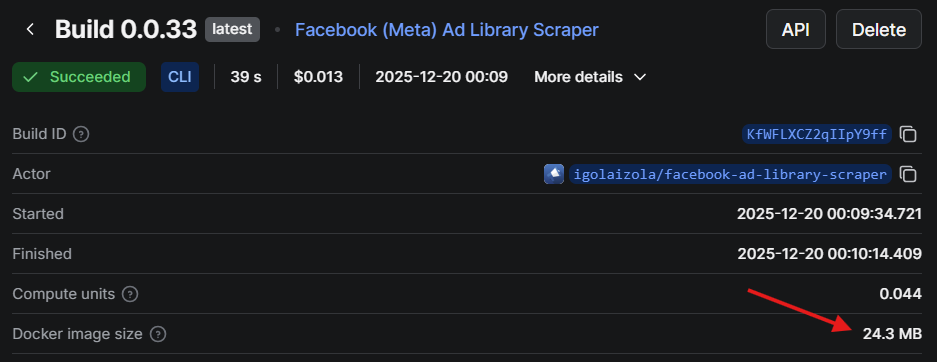
GOOS=$$os GOARCH=$$arch GOARM=$$arm CGO_ENABLED=0 \
go build \
  -a -x -tags netgo,timetzdata -installsuffix cgo -installsuffix netgo \
  -ldflags " \
    -X main.version=$(VERSION) \
    -X main.commit=$(COMMIT_SHORT) \
    -X main.date=$(shell date -u +'%Y-%m-%dT%H:%M:%SZ') \
  " \
  -o "$$out" \
  ./actors/$(ACTOR)/cmd/$(ACTOR)
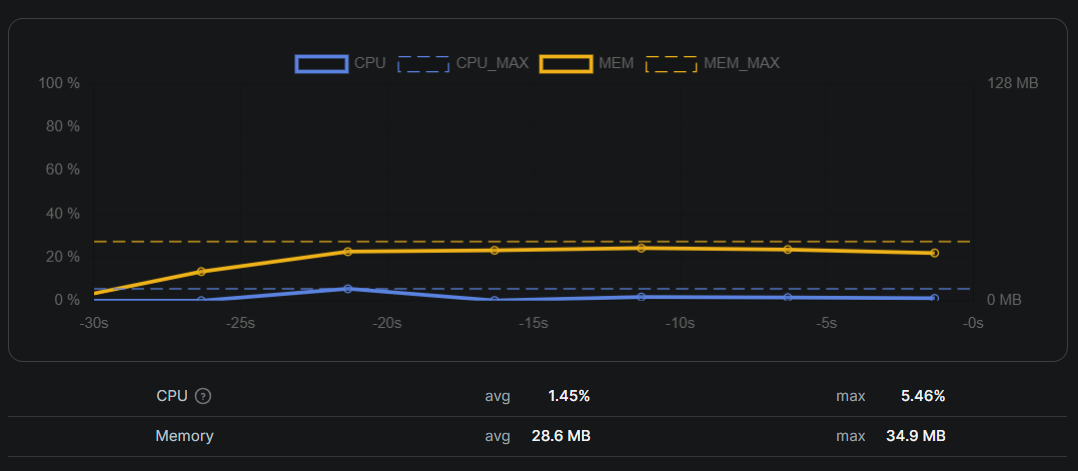
</pre><p>The netgo tag and CGO_ENABLED=0 produce a fully static binary. The timetzdata tag embeds timezone data so I don’t need to install tzdata in the runtime image.</p><h2 id="memory-footprint-and-runtime-cost">Memory footprint and runtime cost</h2><p>My target is the 128 MB Apify tier. I design these Actors to stay comfortably under that limit:</p><ul><li>I avoid headless browsers unless unavoidable</li><li>I stream results in small batches instead of buffering everything</li><li>The runtime image is minimal and contains no extra libraries</li></ul><p>The first version of this setup routinely crossed 128 MB and was killed mid-run. The culprit was a slice accumulating parsed results before flushing to the dataset. Switching to smaller batches and clearing slices after each save brought peak memory usage back under 50 MB.</p>