
As you scale your AWS environment from hundreds to thousands of AWS accounts, maintaining consistent governance standards across this expanded infrastructure requires a strategic approach. Governance controls—the automated policies and rules that enforce standards across your cloud infrastructure—are essential for managing this scale, but implementing them presents two fundamental challenges.
First, without proper controls, a misconfigured Amazon Simple Storage Service (Amazon S3) bucket can expose your sensitive data, an unmonitored resource can drive up your costs unexpectedly, or a compliance audit can reveal policy gaps that require weeks to remediate. Second, you need clarity on what controls exist— how they relate to each other, and what combinations address your specific objectives across security, cost optimization, operational excellence, and compliance domains. Teams spend considerable time on repetitive compliance checks rather than strategic initiatives when they lack a unified approach to control management that streamlines discovery and deployment across your entire organization.
You can use AWS Organizations for preventive controls through service control policies (SCPs), resource control policies (RCPs), and declarative policies, AWS Config for detective controls and compliance monitoring, AWS Control Tower for organization-wide governance, and AWS Security Hub CSPM (Cloud Security Posture Management) for centralized security posture management and automated remediation workflows. While each service excels in its specialized domain, you benefit from a unified view that connects these capabilities into a governance strategy.
AWS Control Tower’s Control Catalog provides centralized visibility and management capabilities that bring these services together, enabling you to discover, evaluate, and deploy controls more efficiently than navigating individual service consoles such as AWS Config, AWS CloudTrail, and AWS Lambda.
A unified solution for control management
AWS Control Tower’s Control Catalog provides a single system of record for managed controls, with visibility and management capabilities. Think of it as a library of over 1,000 controls where every control is cataloged, classified, and interconnected with detailed relationships.
With a collection of over 1,000 controls spanning cost optimization, durability, operational excellence, and security, AWS Control Tower’s Control Catalog brings clarity to your control management. Each control includes detailed metadata that provides insights into its purpose and strategic relationships:
- Domain: Highlights the broad focus area, such as “Data Protection” or “Cost Optimization”
- Objective: Defines the control’s specific purpose, like “Ensure encryption at rest” or “Prevent public access to S3 buckets”
- Common Control: Represents standardized categories that transcend individual services and use cases, allowing you to see all encryption controls together, regardless of which AWS service implements them
Control Tower’s Control Catalog goes beyond simple categorization by mapping controls to 17 major compliance frameworks, including PCI DSS, NIST, FedRAMP, and ISO standards. For organizations pursuing PCI-DSS v4.0 compliance, the catalog provides a view of relevant controls to help you get started and align with best practices—from preventive service control policies (SCPs) to detective controls implemented through AWS Config and AWS Security Hub.
The catalog’s strength is in its mapping of control relationships. When implementing encryption controls, it shows you complementary controls—such as pairing an SCP that enforces AWS Key Management Service (AWS KMS) encryption with a Config rule that monitors encryption settings. This approach helps you build a control strategy, eliminating potential gaps or redundancies.
Control Catalog streamlines your organization-wide deployment of selected controls through AWS Control Tower. You can discover controls in the catalog, then deploy them organization-wide—supporting consistent governance across hundreds or thousands of accounts.
Practical implementation: Data protection workflow
To illustrate how this unified approach works in practice, let’s walk through a common scenario: a security team implementing encryption controls for Amazon DynamoDB while aligning to PCI DSS v4.0 requirements. To try this workflow yourself, follow these steps that demonstrate how AWS Control Tower’s Control Catalog streamlines the control discovery and deployment process.
Step 1: Discover available controls
To try this yourself, access AWS Control Tower’s Control Catalog through the AWS Control Tower console. Once there, you’ll see the dashboard’s filtering capabilities—search by service, compliance framework, common control categories, behavior types, and up to 12 dimensions total. Start by exploring the filters to get familiar with the available controls in your environment.
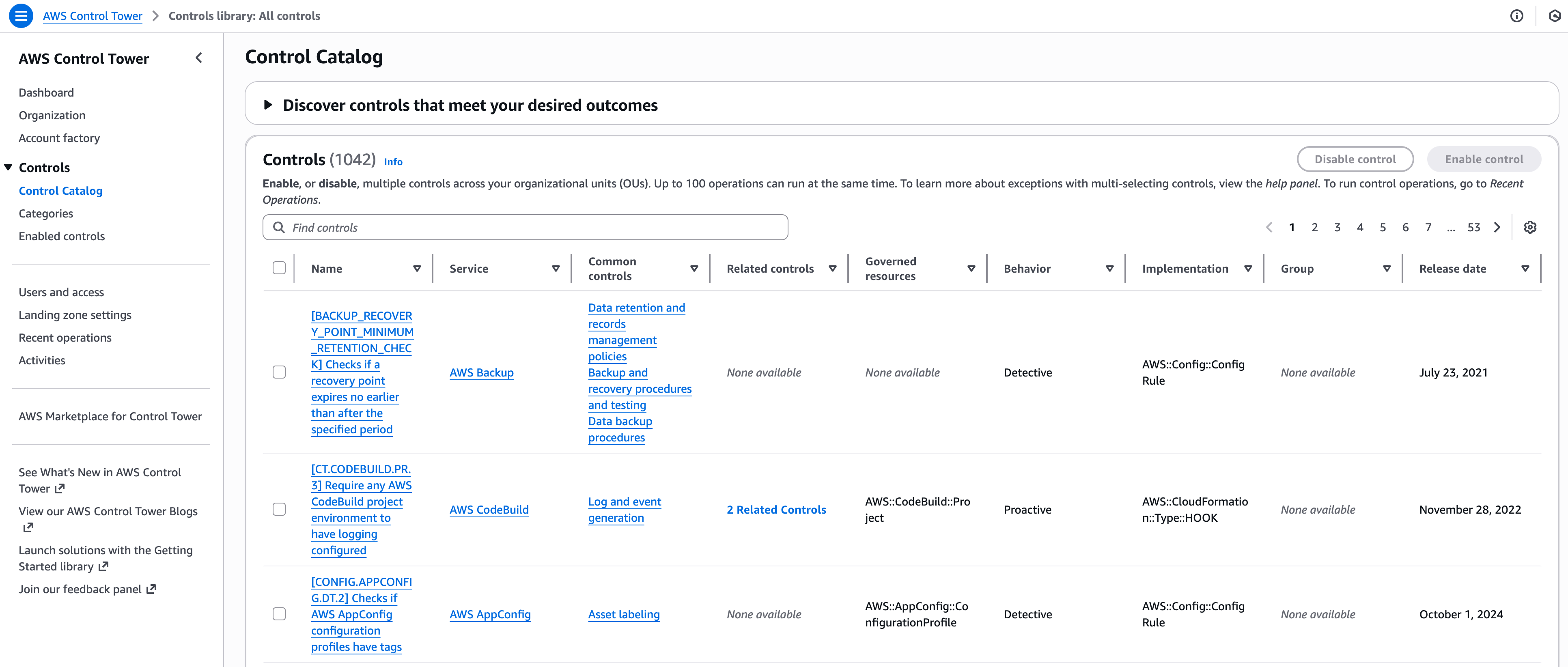
Figure 1: Control Catalog Overview
Step 2: Filter by security objective
To focus on data protection, you apply the “Encrypt data at rest” common control filter. This narrows your view to show only encryption-related controls across all AWS services, demonstrating how the Common Control classification helps you locate relevant security measures regardless of the underlying service.
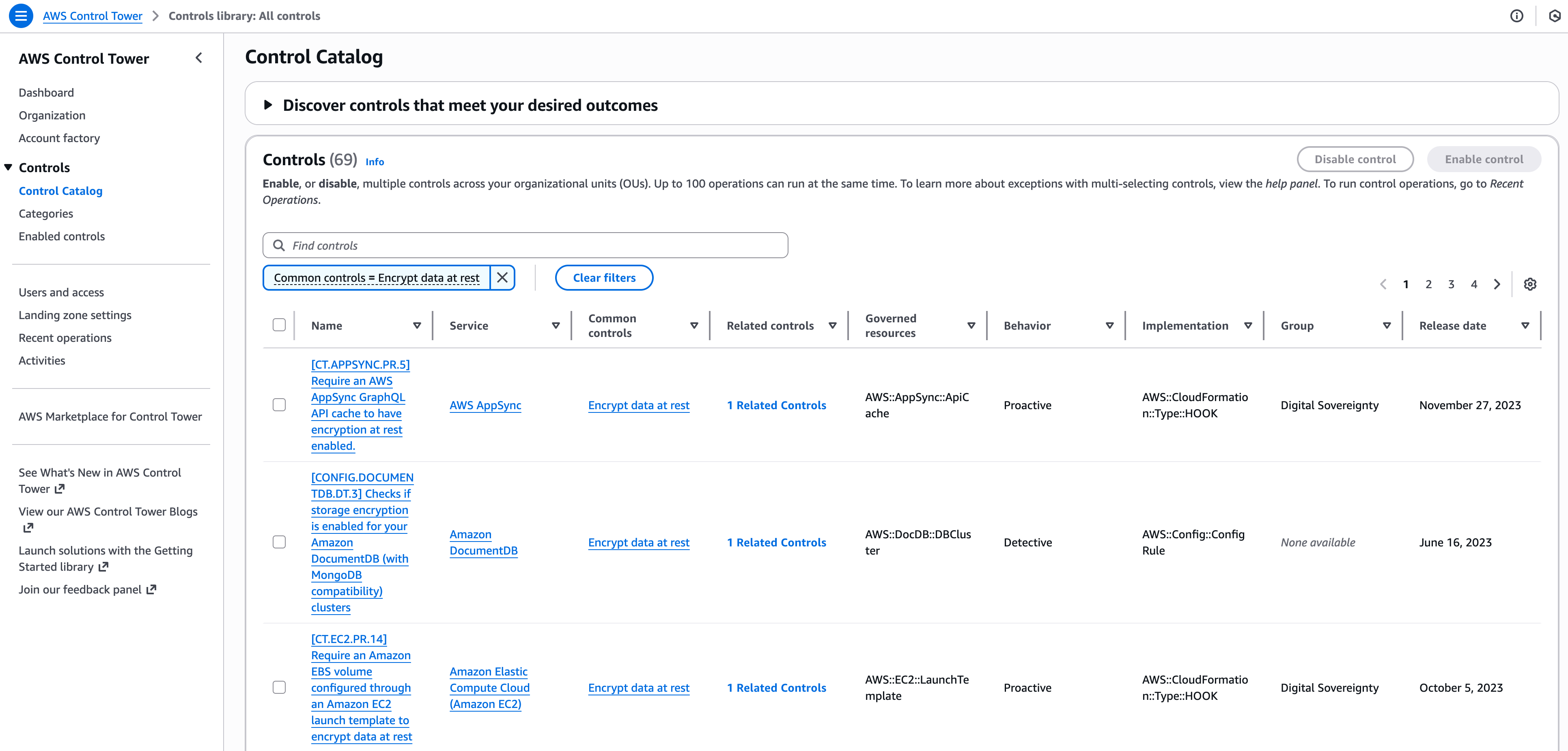
Figure 2: Encryption Controls Filter Applied
Step 3: Target service-specific and compliance requirements
Next, you refine your search further by adding Amazon DynamoDB as the service filter and PCI DSS v4.0 as the compliance framework. This targeted approach shows exactly which DynamoDB encryption controls map to PCI DSS requirements, eliminating guesswork about compliance coverage.
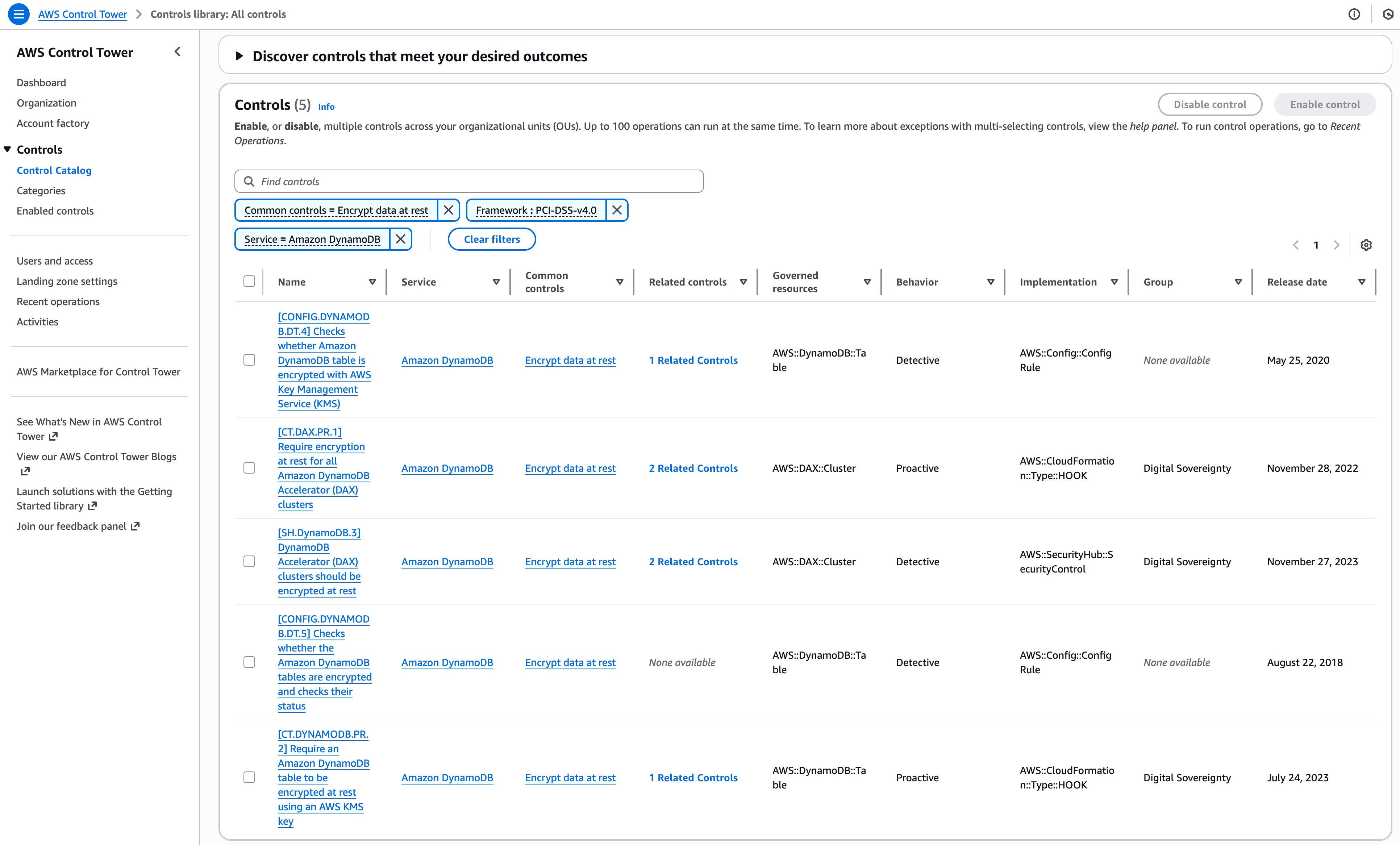
Figure 3: DynamoDB Encryption Controls for PCI DSS Compliance
Step 4: Understand control relationships
To see how controls work together, explore the catalog’s display of different control types. You’ll notice both proactive controls (that allow only approved actions) and detective controls (that monitor and alert on configuration changes) working together. This complementary approach allows you to prevent issues before they occur while maintaining continuous monitoring.
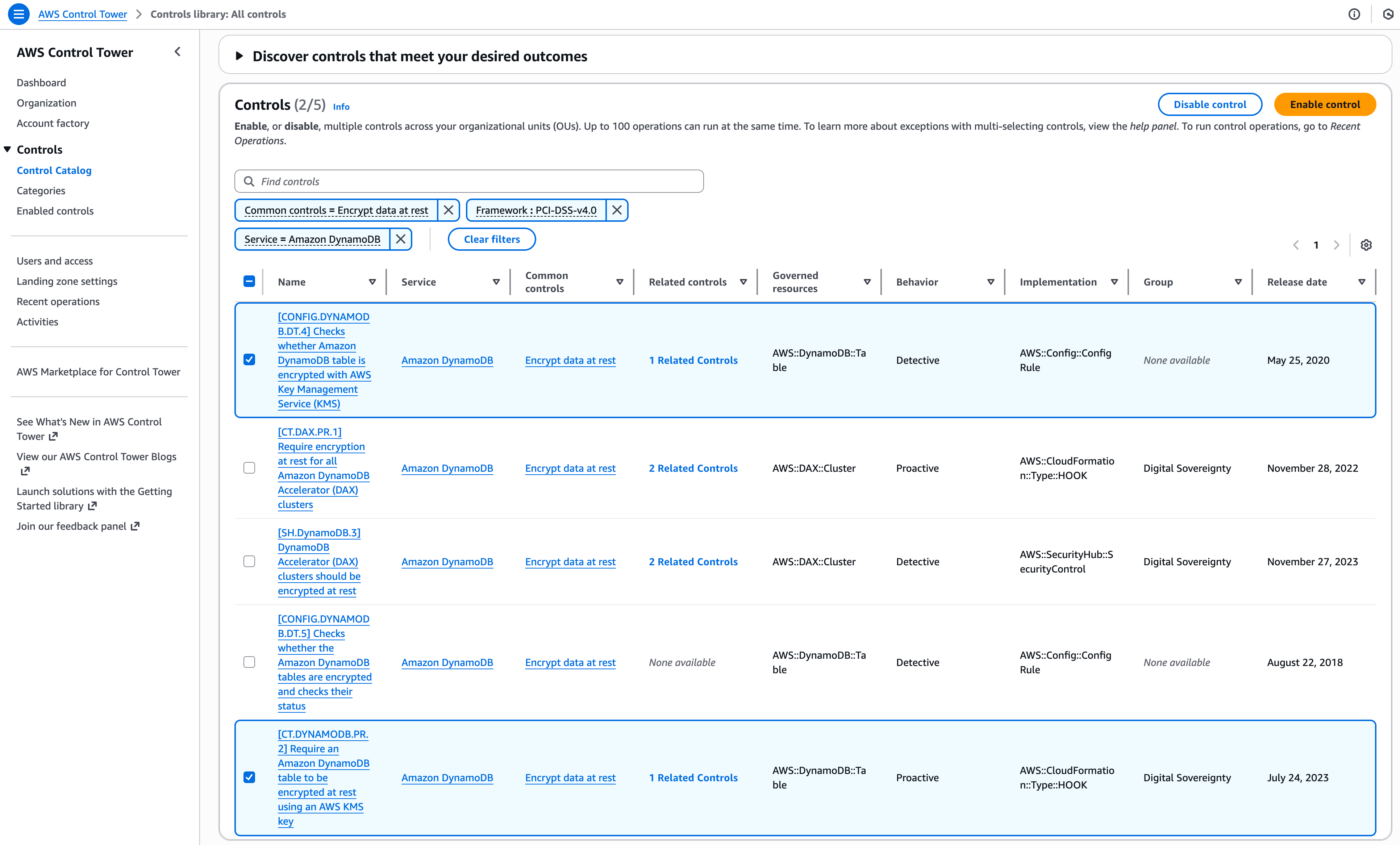
Figure 4: Proactive and Detective Control Pairing
Step 5: Deploy controls organization-wide
To complete the process, deploy your selected controls across your entire organization through Control Tower. Navigate to the Recent operations view to monitor the deployment status, providing you with visibility into the rollout process and maintaining consistent implementation across all accounts.
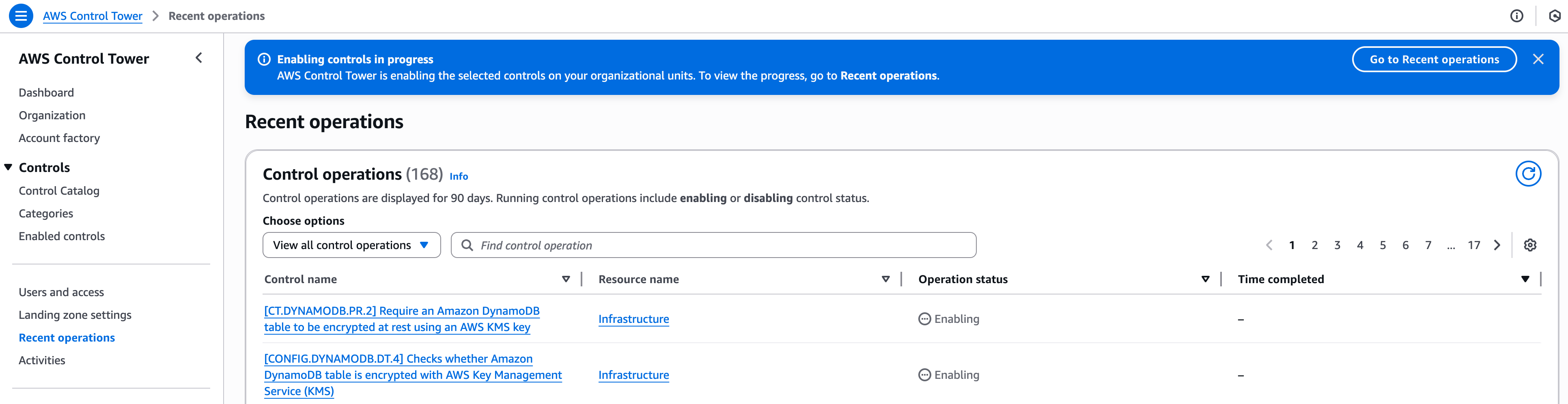
Figure 5: Control Deployment Status Monitoring
This workflow shows how AWS Control Tower’s Control Catalog transforms governance management: what previously required weeks of research across multiple AWS service consoles and manual implementation, can now be completed in minutes—with organization-wide deployment achieved through a unified interface.
For automated workflows, you can also access these capabilities programmatically through the AWS Control Catalog API, AWS CLI, and AWS SDKs to list controls, filter by criteria, and retrieve control details.
Conclusion
AWS Control Tower’s Control Catalog represents an advancement in enterprise control management. It offers a library of controls mapped to major compliance frameworks, enabling you to discover which controls address your regulatory requirements.
With built-in deployment capabilities, controls deploy consistently across your entire AWS Organization, helping maintain uniform governance posture while reducing operational overhead.
Ready to streamline your governance controls? Start by exploring AWS Control Tower’s Control Catalog in your AWS environment. Visit the Control Catalog console to discover available controls, or learn more about the AWS Control Tower Control Catalog for your organization.